Move Selector reference
This chapter describes the move selectors that can be used to select moves for the optimization algorithms.
| Move Selectors are not public API and even though they are not yet deprecated, we encourage you to check out the the Neighborhoods API, which will eventually entirely replace the Move Selectors API. |
1. What is a MoveSelector?
A MoveSelector's main function is to create Iterator<Move> when needed.
An optimization algorithm will iterate through a subset of those moves.
Here’s an example how to configure a changeMoveSelector for the optimization algorithm Local Search:
  <localSearch>
    <changeMoveSelector/>
    ...
  </localSearch>
Out of the box, this works and all properties of the changeMoveSelector are defaulted sensibly (unless that fails fast due to ambiguity). On the other hand, the configuration can be customized significantly for specific use cases.
For example: you might want to configure a filter to discard pointless moves.
1.1. Subselecting of entities, values, and other moves
To create a Move, a MoveSelector needs to select one or more planning entities and/or planning values to move.
Just like MoveSelectors, EntitySelectors and ValueSelectors need to support a similar feature set (such as scalable just-in-time selection). Therefore, they all implement a common interface Selector and they are configured similarly.
A MoveSelector is often composed out of EntitySelectors, ValueSelectors or even other MoveSelectors, which can be configured individually if desired:
    <unionMoveSelector>
      <changeMoveSelector>
        <entitySelector>
          ...
        </entitySelector>
        <valueSelector>
          ...
        </valueSelector>
        ...
      </changeMoveSelector>
      <swapMoveSelector>
        ...
      </swapMoveSelector>
    </unionMoveSelector>
Together, this structure forms a Selector tree:
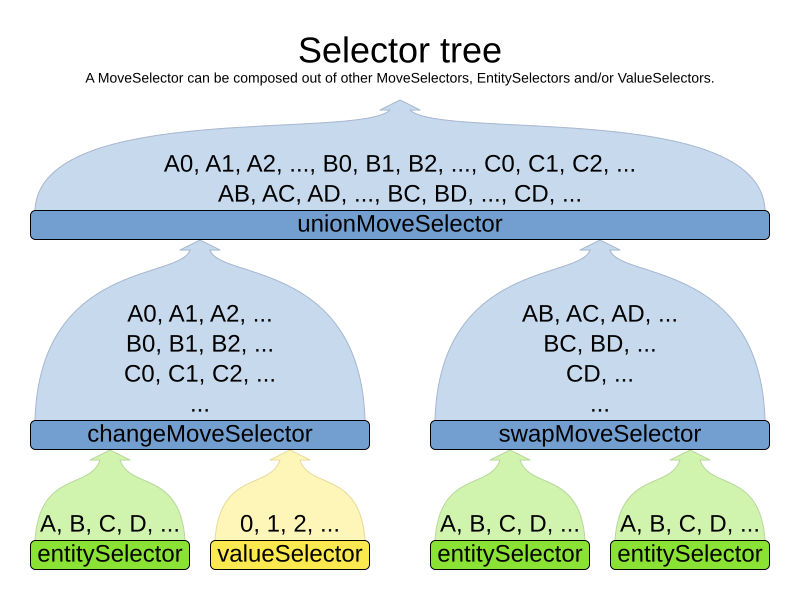
The root of this tree is a MoveSelector which is injected into the optimization algorithm implementation to be (partially) iterated in every step.
For a full list of MoveSelector implementations available out of the box,
see Move Selector reference.
1.2. Combining multiple MoveSelectors
1.2.1. unionMoveSelector
A unionMoveSelector selects a Move by selecting one of its MoveSelector children to supply the next Move.
Simplest configuration:
    <unionMoveSelector>
      <...MoveSelector/>
      <...MoveSelector/>
      <...MoveSelector/>
      ...
    </unionMoveSelector>
Advanced configuration:
    <unionMoveSelector>
      ... <!-- Normal selector properties -->
      <changeMoveSelector>
        <fixedProbabilityWeight>...</fixedProbabilityWeight>
        ...
      </changeMoveSelector>
      <swapMoveSelector>
        <fixedProbabilityWeight>...</fixedProbabilityWeight>
        ...
      </swapMoveSelector>
      <...MoveSelector>
        <fixedProbabilityWeight>...</fixedProbabilityWeight>
        ...
      </...MoveSelector>
      ...
      <selectorProbabilityWeightFactoryClass>...ProbabilityWeightFactory</selectorProbabilityWeightFactoryClass>
    </unionMoveSelector>
The selectorProbabilityWeightFactory determines in selectionOrder RANDOM how often a MoveSelector child is selected to supply the next Move.
By default, each MoveSelector child has the same chance of being selected.
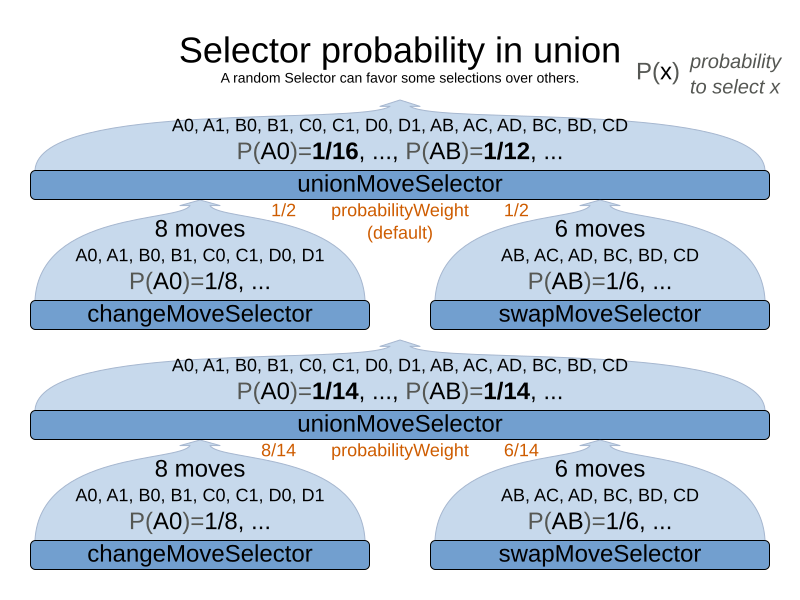
Change the fixedProbabilityWeight of such a child to select it more often.
For example, the unionMoveSelector can return a SwapMove twice as often as a ChangeMove:
    <unionMoveSelector>
      <changeMoveSelector>
        <fixedProbabilityWeight>1.0</fixedProbabilityWeight>
        ...
      </changeMoveSelector>
      <swapMoveSelector>
        <fixedProbabilityWeight>2.0</fixedProbabilityWeight>
        ...
      </swapMoveSelector>
    </unionMoveSelector>
The number of possible ChangeMoves is very different from the number of possible SwapMoves and furthermore it’s problem dependent.
To give each individual Move the same selection chance (as opposed to each MoveSelector), use the FairSelectorProbabilityWeightFactory:
    <unionMoveSelector>
      <changeMoveSelector/>
      <swapMoveSelector/>
      <selectorProbabilityWeightFactoryClass>ai.timefold.solver.core.impl.heuristic.selector.common.decorator.FairSelectorProbabilityWeightFactory</selectorProbabilityWeightFactoryClass>
    </unionMoveSelector>
1.2.2. cartesianProductMoveSelector
A cartesianProductMoveSelector selects a new CompositeMove.
It builds that CompositeMove by selecting one Move per MoveSelector child and adding it to the CompositeMove.
Simplest configuration:
    <cartesianProductMoveSelector>
      <...MoveSelector/>
      <...MoveSelector/>
      <...MoveSelector/>
      ...
    </cartesianProductMoveSelector>
Advanced configuration:
    <cartesianProductMoveSelector>
      ... <!-- Normal selector properties -->
      <changeMoveSelector>
        ...
      </changeMoveSelector>
      <swapMoveSelector>
        ...
      </swapMoveSelector>
      <...MoveSelector>
        ...
      </...MoveSelector>
      ...
      <ignoreEmptyChildIterators>true</ignoreEmptyChildIterators>
    </cartesianProductMoveSelector>
The ignoreEmptyChildIterators property (true by default) will ignore every empty childMoveSelector to avoid returning no moves.
For example: a cartesian product of changeMoveSelector A and B, for which B is empty (because all it’s entities are pinned) returns no move if ignoreEmptyChildIterators is false and the moves of A if ignoreEmptyChildIterators is true.
To enforce that two child selectors use the same entity or value efficiently, use mimic selection, not move filtering.
1.3. EntitySelector
Simplest configuration:
<entitySelector/>Advanced configuration:
      <entitySelector>
        ... <!-- Normal selector properties -->
        <entityClass>org.acme.vehiclerouting.domain.Vehicle</entityClass>
      </entitySelector>
The entityClass property is only required if it cannot be deduced automatically because there are multiple entity classes.
1.4. ValueSelector
Simplest configuration:
<valueSelector/>Advanced configuration:
      <valueSelector variableName="room">
        ... <!-- Normal selector properties -->
      </valueSelector>
The variableName property is only required if it cannot be deduced automatically because there are multiple variables (for the related entity class).
In exotic Construction Heuristic configurations, the entityClass from the EntitySelector sometimes needs to be downcasted, which can be done with the property downcastEntityClass:
      <valueSelector variableName="period">
        <downcastEntityClass>...LeadingExam</downcastEntityClass>
      </valueSelector>
If a selected entity cannot be downcasted, the ValueSelector is empty for that entity.
1.5. General Selector features
1.5.1. CacheType: create moves ahead of time or just in time
A Selector's cacheType determines when a selection (such as a Move, an entity, a value, …)
is created and how long it lives.
Almost every Selector supports setting a cacheType:
    <changeMoveSelector>
      <cacheType>PHASE</cacheType>
      ...
    </changeMoveSelector>
The following cacheTypes are supported:
-
JUST_IN_TIME(default, recommended): Not cached. Construct each selection (Move, …) just before it’s used. This scales up well in memory footprint. -
STEP: Cached. Create each selection (Move, …) at the beginning of a step and cache them in a list for the remainder of the step. This scales up badly in memory footprint. -
PHASE: Cached. Create each selection (Move, …) at the beginning of a solver phase and cache them in a list for the remainder of the phase. Some selections cannot be phase cached because the list changes every step. This scales up badly in memory footprint, but has a slight performance gain. -
SOLVER: Cached. Create each selection (Move, …) at the beginning of aSolverand cache them in a list for the remainder of theSolver. Some selections cannot be solver cached because the list changes every step. This scales up badly in memory footprint, but has a slight performance gain.
A cacheType can be set on composite selectors too:
    <unionMoveSelector>
      <cacheType>PHASE</cacheType>
      <changeMoveSelector/>
      <swapMoveSelector/>
      ...
    </unionMoveSelector>
Nested selectors of a cached selector cannot be configured to be cached themselves, unless it’s a higher cacheType.
For example: a STEP cached unionMoveSelector can contain a PHASE cached changeMoveSelector,
but it cannot contain a STEP cached changeMoveSelector.
1.5.2. SelectionOrder: original, sorted, random, shuffled, or probabilistic
A Selector's selectionOrder determines the order in which the selections (such as Moves, entities, values, …) are iterated.
An optimization algorithm will usually only iterate through a subset of its MoveSelector's selections, starting from the start, so the selectionOrder is critical to decide which Moves are actually evaluated.
Almost every Selector supports setting a selectionOrder:
    <changeMoveSelector>
      ...
      <selectionOrder>RANDOM</selectionOrder>
      ...
    </changeMoveSelector>
The following selectionOrders are supported:
-
ORIGINAL: Select the selections (Moves, entities, values, …) in default order. Each selection will be selected only once.-
For example: A0, A1, A2, A3, …, B0, B1, B2, B3, …, C0, C1, C2, C3, …
-
-
SORTED: Select the selections (
Moves, entities, values, …) in sorted order. Each selection will be selected only once. RequirescacheType >= STEP. Mostly used on anentitySelectororvalueSelectorfor construction heuristics. See sorted selection.-
For example: A0, B0, C0, …, A2, B2, C2, …, A1, B1, C1, …
-
-
RANDOM (default): Select the selections (
Moves, entities, values, …) in non-shuffled random order. A selection might be selected multiple times. This scales up well in performance because it does not require caching.-
For example: C2, A3, B1, C2, A0, C0, …
-
-
SHUFFLED: Select the selections (
Moves, entities, values, …) in shuffled random order. Each selection will be selected only once. RequirescacheType >= STEP. This scales up badly in performance, not just because it requires caching, but also because a random number is generated for each element, even if it’s not selected (which is the grand majority when scaling up).-
For example: C2, A3, B1, A0, C0, …
-
-
PROBABILISTIC: Select the selections (
Moves, entities, values, …) in random order, based on the selection probability of each element. A selection with a higher probability has a higher chance to be selected than elements with a lower probability. A selection might be selected multiple times. RequirescacheType >= STEP. Mostly used on anentitySelectororvalueSelector. See probabilistic selection.-
For example: B1, B1, A1, B2, B1, C2, B1, B1, …
-
A selectionOrder can be set on composite selectors too.
|
When a |
1.5.3. Recommended combinations of CacheType and SelectionOrder
Just in time random selection (default)
This combination is great for big use cases (10 000 entities or more), as it scales up well in memory footprint and performance.
Other combinations are often not even viable on such sizes.
It works for smaller use cases too, so it’s a good way to start out.
It’s the default, so this explicit configuration of cacheType and selectionOrder is actually obsolete:
    <unionMoveSelector>
      <cacheType>JUST_IN_TIME</cacheType>
      <selectionOrder>RANDOM</selectionOrder>

      <changeMoveSelector/>
      <swapMoveSelector/>
    </unionMoveSelector>
Here’s how it works.
When Iterator<Move>.next() is called, a child MoveSelector is randomly selected (1), which creates a random Move (2, 3, 4) and is then returned (5):
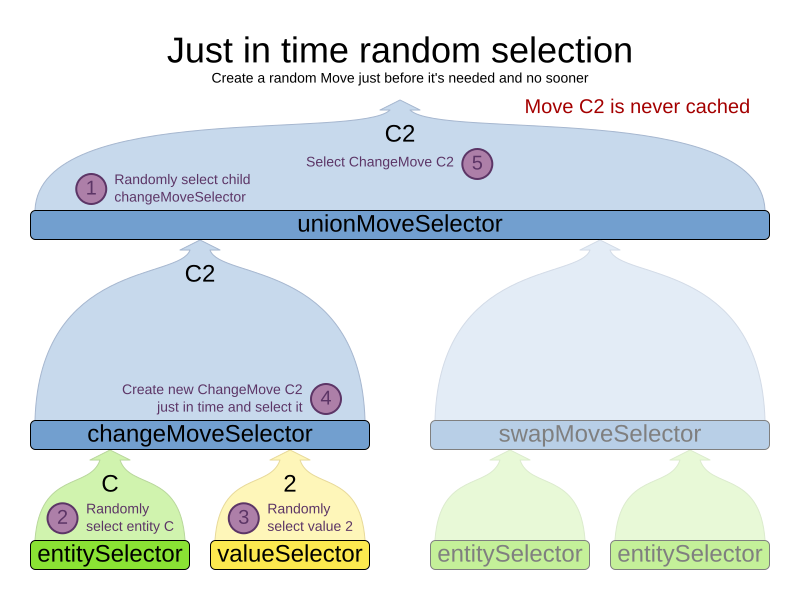
Notice that it never creates a list of Moves and it generates random numbers only for Moves that are actually selected.
Cached shuffled selection
This combination often wins for small use cases (1000 entities or less). Beyond that size, it scales up badly in memory footprint and performance.
    <unionMoveSelector>
      <cacheType>PHASE</cacheType>
      <selectionOrder>SHUFFLED</selectionOrder>

      <changeMoveSelector/>
      <swapMoveSelector/>
    </unionMoveSelector>
Here’s how it works: At the start of the phase (or step depending on the cacheType), all moves are created (1) and cached (2). When MoveSelector.iterator() is called, the moves are shuffled (3). When Iterator<Move>.next() is called, the next element in the shuffled list is returned (4):
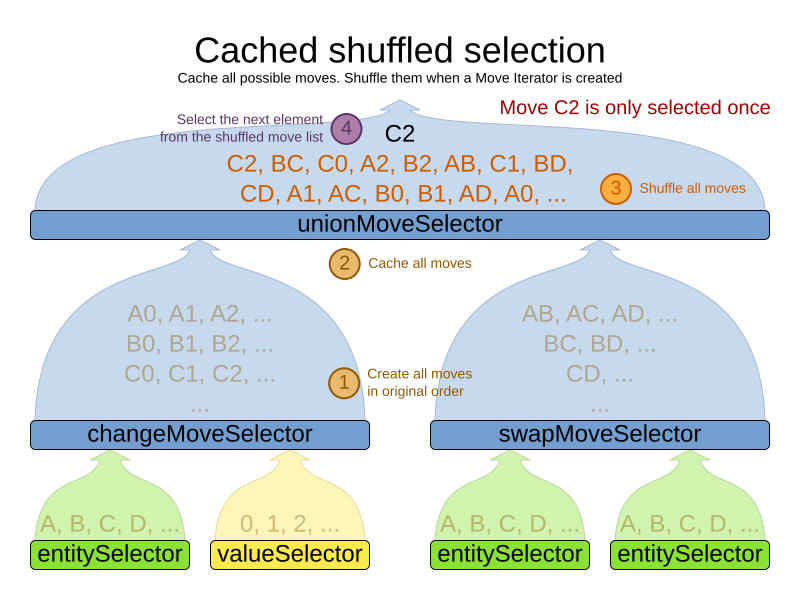
Notice that each Move will only be selected once, even though they are selected in random order.
Use cacheType PHASE if none of the (possibly nested) Selectors require STEP.
Otherwise, do something like this:
    <unionMoveSelector>
      <cacheType>STEP</cacheType>
      <selectionOrder>SHUFFLED</selectionOrder>

      <changeMoveSelector>
        <cacheType>PHASE</cacheType>
      </changeMoveSelector>
      <swapMoveSelector>
        <cacheType>PHASE</cacheType>
      </swapMoveSelector>
      <pillarSwapMoveSelector/><!-- Does not support cacheType PHASE -->
    </unionMoveSelector>
Cached random selection
This combination is often a worthy competitor for medium use cases, especially with fast stepping optimization algorithms (such as Simulated Annealing). Unlike cached shuffled selection, it doesn’t waste time shuffling the moves list at the beginning of every step.
    <unionMoveSelector>
      <cacheType>PHASE</cacheType>
      <selectionOrder>RANDOM</selectionOrder>

      <changeMoveSelector/>
      <swapMoveSelector/>
    </unionMoveSelector>
1.5.4. Filtered selection
There can be certain moves that you don’t want to select, because:
-
The move is pointless and would only waste CPU time. For example, swapping two lectures of the same course will result in the same score and the same schedule, because all lectures of one course are interchangeable (same teacher, same students, same topic).
-
Doing the move would break a built-in hard constraint, so the solution would be infeasible but the score function doesn’t check built-in hard constraints for performance reasons. For example, don’t change a gym lecture to a room which is not a gym room. It’s usually better to not use move filtering for such cases, because it allows the metaheuristics to temporarily break hard constraints to escape local optima.
Any built-in hard constraint must probably be filtered on every move type of every solver phase. For example if it filters the change move of Local Search, it must also filter the swap move that swaps the room of a gym lecture with another lecture for which the other lecture’s original room isn’t a gym room. Furthermore, it must also filter the change moves of the Construction Heuristics (which requires an advanced configuration).
If a move is unaccepted by the filter, it’s not executed and the score isn’t calculated.
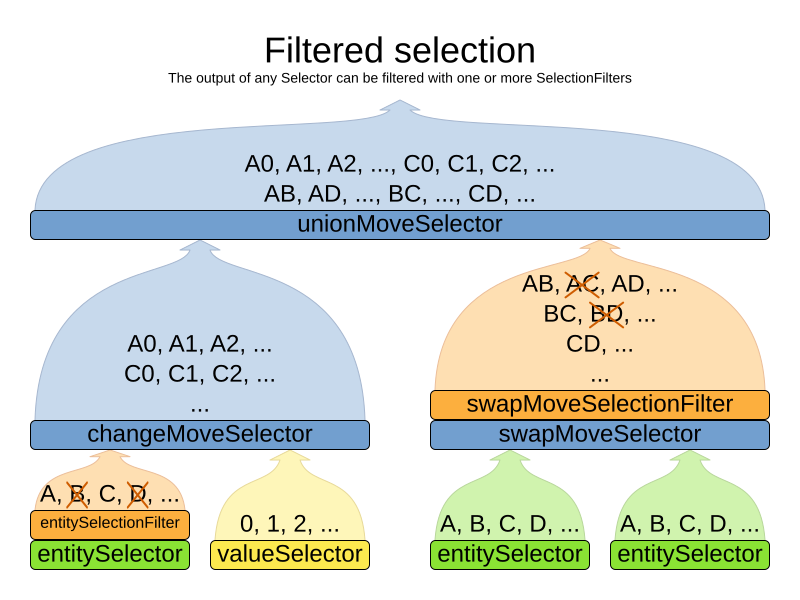
Filtering uses the interface SelectionFilter:
public interface SelectionFilter<Solution_, T> {

    boolean accept(ScoreDirector<Solution_> scoreDirector, T selection);

}
Implement the accept method to return false on a discarded selection (see below).
Filtered selection can happen on any Selector in the selector tree, including any MoveSelector, EntitySelector
or ValueSelector.
It works with any cacheType and selectionOrder.
|
Apply the filter on the lowest level possible. In most cases, you’ll need to know both the entity and the value involved so you’ll have to apply it on the move selector. |
|
|
Filtered move selection
Unaccepted moves will not be selected and will therefore never need to be undone:
public class DifferentCourseSwapMoveFilter implements SelectionFilter<CourseSchedule, SwapMove> {

    @Override
    public boolean accept(ScoreDirector<CourseSchedule> scoreDirector, SwapMove move) {
        Lecture leftLecture = (Lecture) move.getLeftEntity();
        Lecture rightLecture = (Lecture) move.getRightEntity();
        return !leftLecture.getCourse().equals(rightLecture.getCourse());
    }

}
Configure the filterClass on every targeted moveSelector
(potentially both in the Local Search and the Construction Heuristics if it filters ChangeMoves):
    <swapMoveSelector>
      <filterClass>...DifferentCourseSwapMoveFilter</filterClass>
    </swapMoveSelector>
Filtered entity selection
Unaccepted entities will not be selected and will therefore never be used to create a move.
public class LongLectureSelectionFilter implements SelectionFilter<CourseSchedule, Lecture> {

    @Override
    public boolean accept(ScoreDirector<CourseSchedule> scoreDirector, Lecture lecture) {
        return lecture.isLong();
    }

}
Configure the filterClass on every targeted entitySelector (potentially both in the Local Search and the Construction Heuristics):
    <changeMoveSelector>
      <entitySelector>
        <filterClass>...LongLectureSelectionFilter</filterClass>
      </entitySelector>
    </changeMoveSelector>
If that filter should apply on all entities, configure it as a global pinningFilter instead.
Filtered value selection
Unaccepted values will not be selected and will therefore never be used to create a move.
public class LongPeriodSelectionFilter implements SelectionFilter<CourseSchedule, Period> {

    @Override
    public boolean accept(ScoreDirector<CourseSchedule> scoreDirector, Period period) {
        return period();
    }

}
Configure the filterClass on every targeted valueSelector (potentially both in the Local Search and the Construction Heuristics):
    <changeMoveSelector>
      <valueSelector>
        <filterClass>...LongPeriodSelectionFilter</filterClass>
      </valueSelector>
    </changeMoveSelector>
1.5.5. Sorted selection
Sorted selection can happen on any Selector in the selector tree, including any MoveSelector, EntitySelector or ValueSelector.
It does not work with cacheType JUST_IN_TIME and it only works with selectionOrder SORTED.
It’s mostly used in construction heuristics.
|
If the chosen construction heuristic implies sorting, for example |
Sorted selection by SorterManner
Some Selector types implement a SorterManner out of the box:
-
EntitySelectorsupports:-
DESCENDING: Sorts the planning entities in descending order based on a give metric (planning entity sorting). Requires that planning entity is annotated on the domain model.<entitySelector> <cacheType>PHASE</cacheType> <selectionOrder>SORTED</selectionOrder> <sorterManner>DESCENDING</sorterManner> </entitySelector>
-
-
ValueSelectorsupports:-
ASCENDING: Sorts the planning values in ascending order based on a given metric (planning value sorting). Requires that planning value is annotated on the domain model.<valueSelector> <cacheType>PHASE</cacheType> <selectionOrder>SORTED</selectionOrder> <sorterManner>ASCENDING</sorterManner> </valueSelector>
-
Sorted selection by Comparator
An easy way to sort a Selector is with a plain old Comparator:
public class VisitComparator implements Comparator<Visit> {

    public int compare(Visit a, Visit b) {
        return new CompareToBuilder()
                .append(a.getServiceDuration(), b.getServiceDuration())
                .append(a.getId(), b.getId())
                .toComparison();
    }

}
You’ll also need to configure it (unless it’s annotated on the domain model and automatically applied by the optimization algorithm):
    <entitySelector>
      <cacheType>PHASE</cacheType>
      <selectionOrder>SORTED</selectionOrder>
      <comparatorClass>...VisitComparator</comparatorClass>
      <sorterOrder>DESCENDING</sorterOrder>
</entitySelector>|
|
Sorted selection by ComparatorFactory
If you need the entire solution to sort a Selector, use a ComparatorFactory instead:
public interface ComparatorFactory<Solution_, T> {

    Comparator<T> createComparator(Solution_ solution);

}
You’ll also need to configure it (unless it’s annotated on the domain model and automatically applied by the optimization algorithm):
    <entitySelector>
      <cacheType>PHASE</cacheType>
      <selectionOrder>SORTED</selectionOrder>
      <comparatorFactoryClass>...MyComparatorFactory</comparatorFactoryClass>
      <sorterOrder>DESCENDING</sorterOrder>
</entitySelector>|
|
Sorted selection by SelectionSorter
Alternatively, you can also use the interface SelectionSorter directly:
public interface SelectionSorter<Solution_, T> {

    void sort(ScoreDirector<Solution_> scoreDirector, List<T> selectionList);

}
<entitySelector>
<cacheType>PHASE</cacheType>
<selectionOrder>SORTED</selectionOrder>
<sorterClass>...MyEntitySorter</sorterClass>
</entitySelector>|
|
1.5.6. Probabilistic selection
Probabilistic selection can happen on any Selector in the selector tree, including any MoveSelector, EntitySelector or ValueSelector.
It does not work with cacheType JUST_IN_TIME and it only works with selectionOrder PROBABILISTIC.
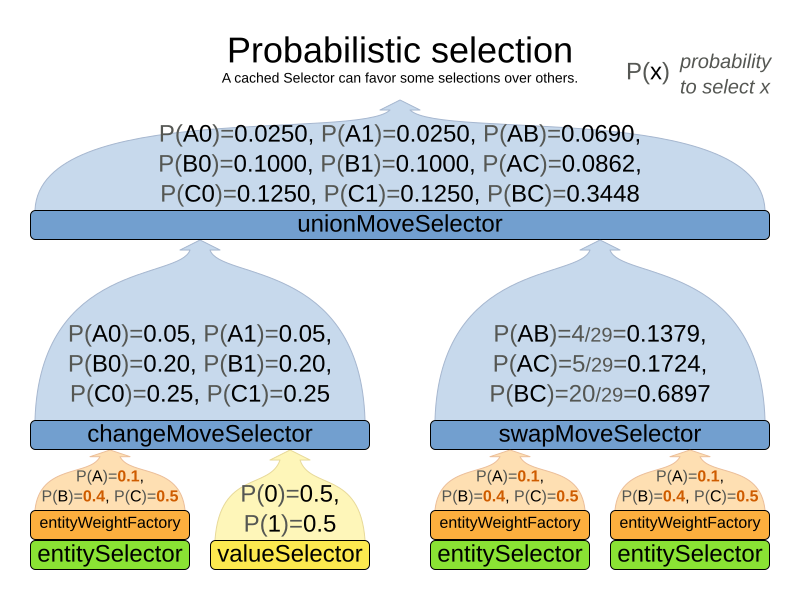
Each selection has a probabilityWeight, which determines the chance that selection will be selected:
public interface SelectionProbabilityWeightFactory<Solution_, T> {

    double createProbabilityWeight(ScoreDirector<Solution_> scoreDirector, T selection);

}
<entitySelector>
<cacheType>PHASE</cacheType>
<selectionOrder>PROBABILISTIC</selectionOrder>
<probabilityWeightFactoryClass>...MyEntityProbabilityWeightFactoryClass</probabilityWeightFactoryClass>
</entitySelector>Assume the following entities: lesson A (probabilityWeight 2.0), lesson B (probabilityWeight 0.5) and lesson C (probabilityWeight 0.5). Then lesson A will be selected four times more than B and C.
|
|
1.5.7. Limited selection
Selecting all possible moves sometimes does not scale well enough,
especially for construction heuristics,
which don’t support acceptedCountLimit.
To limit the number of selected selection per step, apply a selectedCountLimit on the selector:
    <changeMoveSelector>
      <selectedCountLimit>100</selectedCountLimit>
</changeMoveSelector>|
To scale Local Search,
setting |
1.5.8. Mimic selection (record/replay)
During mimic selection, one normal selector records its selection and one or multiple other special selectors replay that selection. The recording selector acts as a normal selector and supports all other configuration properties. A replaying selector mimics the recording selection and supports no other configuration properties.
The recording selector needs an id.
A replaying selector must reference a recorder’s id with a mimicSelectorRef:
      <cartesianProductMoveSelector>
        <changeMoveSelector>
          <entitySelector id="entitySelector"/>
          <valueSelector variableName="period"/>
        </changeMoveSelector>
        <changeMoveSelector>
          <entitySelector mimicSelectorRef="entitySelector"/>
          <valueSelector variableName="room"/>
        </changeMoveSelector>
      </cartesianProductMoveSelector>
Mimic selection is useful to create a composite move from two moves that affect the same entity.
1.5.9. Nearby selection
|
Nearby selection is a commercial feature of Timefold Solver Enterprise Edition. |
Read about nearby selection in the Nearby selection section of the Enterprise Edition manual.
2. Move selectors for basic variables
These moves are applicable to planning variables that aren’t part of a list, also called basic variables.
2.1. ChangeMoveSelector
For one planning variable, the ChangeMove selects one planning entity and one planning value and assigns the entity’s variable to that value.
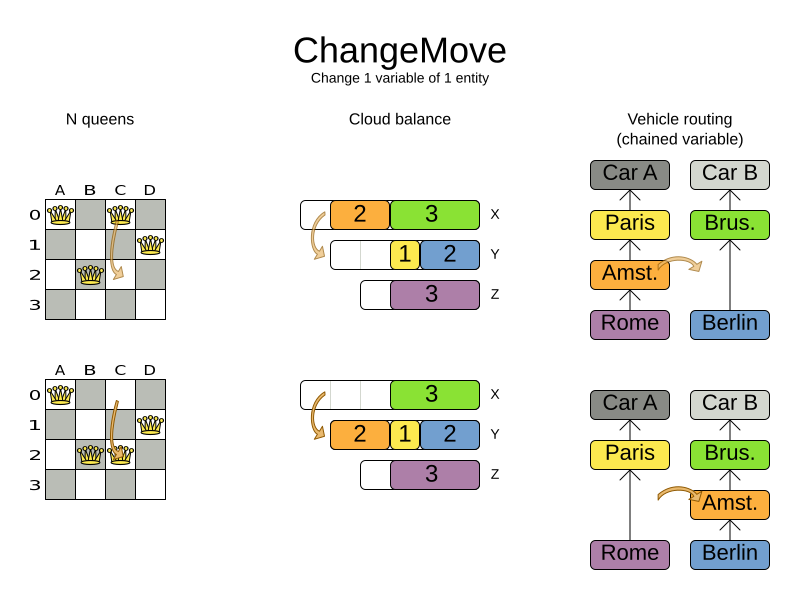
Simplest configuration:
<changeMoveSelector/>If there are multiple entity classes or multiple planning variables for one entity class,
a simple configuration will automatically unfold into
an union
of ChangeMove selectors for every planning variable.
Advanced configuration:
    <changeMoveSelector>
      ... <!-- Normal selector properties -->
      <entitySelector>
        <entityClass>...Lecture</entityClass>
        ...
      </entitySelector>
      <valueSelector variableName="room">
        ...
      </valueSelector>
    </changeMoveSelector>
A ChangeMove is the finest grained move.
|
Almost every |
2.2. SwapMoveSelector
The SwapMove selects two different planning entities and swaps the planning values of all their planning variables.
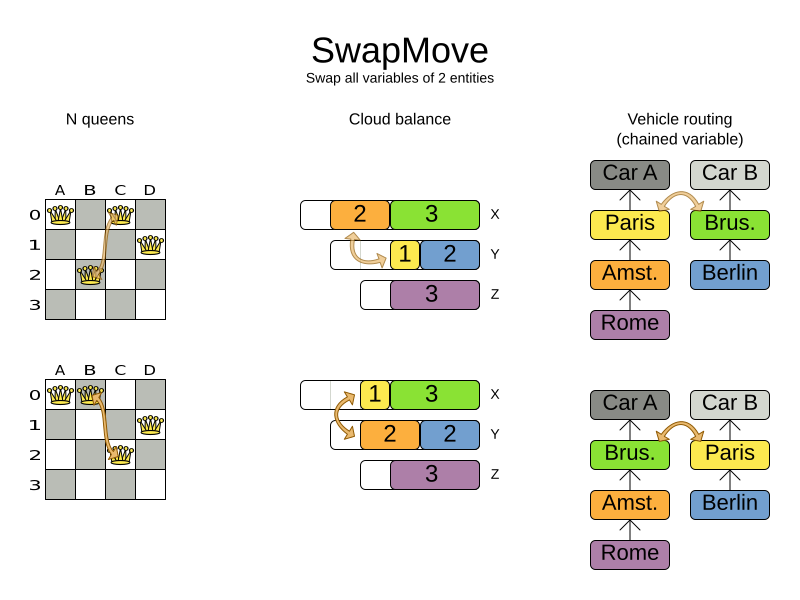
Although a SwapMove on a single variable is essentially just two ChangeMoves,
it’s often the winning step in cases that the first of the two ChangeMoves would not win
because it leaves the solution in a state with broken hard constraints.
For example: swapping the room of two lectures doesn’t bring the solution in an intermediate state where both lectures are in the same room which breaks a hard constraint.
Simplest configuration:
<swapMoveSelector/>If there are multiple entity classes, a simple configuration will automatically unfold
into an union of SwapMove selectors for every entity class.
Advanced configuration:
    <swapMoveSelector>
      ... <!-- Normal selector properties -->
      <entitySelector>
        <entityClass>...Lecture</entityClass>
        ...
      </entitySelector>
      <secondaryEntitySelector>
        <entityClass>...Lecture</entityClass>
        ...
      </secondaryEntitySelector>
      <variableNameIncludes>
        <variableNameInclude>room</variableNameInclude>
        <variableNameInclude>...</variableNameInclude>
      </variableNameIncludes>
    </swapMoveSelector>
The secondaryEntitySelector is rarely needed: if it is not specified, entities from the same entitySelector are swapped.
If one or more variableNameInclude properties are specified, not all planning variables will be swapped, but only those specified.
2.3. Pillar-based move selectors
A pillar is a set of planning entities which have the same planning value(s) for their planning variable(s).
2.3.1. PillarChangeMoveSelector
The PillarChangeMove selects one entity pillar (or subset of those) and changes the value of one variable (which is the same for all entities) to another value.
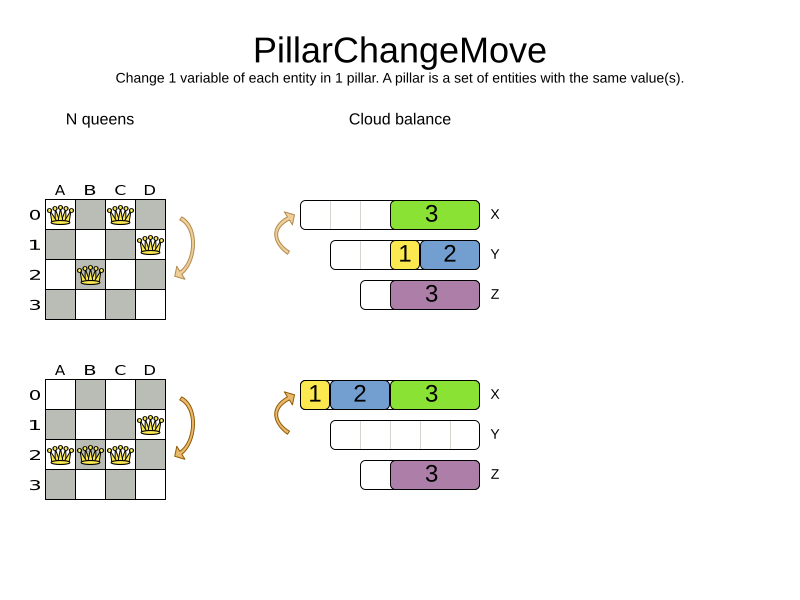
In the example above, queen A and C have the same value (row 0) and are moved to row 2. Also the yellow and blue process have the same value (computer Y) and are moved to computer X.
Simplest configuration:
<pillarChangeMoveSelector/>Advanced configuration:
    <pillarChangeMoveSelector>
      <subPillarType>SEQUENCE</subPillarType>
      <subPillarSequenceComparatorClass>...ShiftComparator</subPillarSequenceComparatorClass>
      ... <!-- Normal selector properties -->
      <pillarSelector>
        <entitySelector>
          <entityClass>...Shift</entityClass>
          ...
        </entitySelector>
        <minimumSubPillarSize>1</minimumSubPillarSize>
        <maximumSubPillarSize>1000</maximumSubPillarSize>
      </pillarSelector>
      <valueSelector variableName="employee">
        ...
      </valueSelector>
    </pillarChangeMoveSelector>
For a description of subPillarType and related properties, please refer to Sub-pillars.
The other properties are explained in changeMoveSelector. This move selector doesn’t support phase or solver caching and step caching scales badly memory wise.
2.3.2. PillarSwapMoveSelector
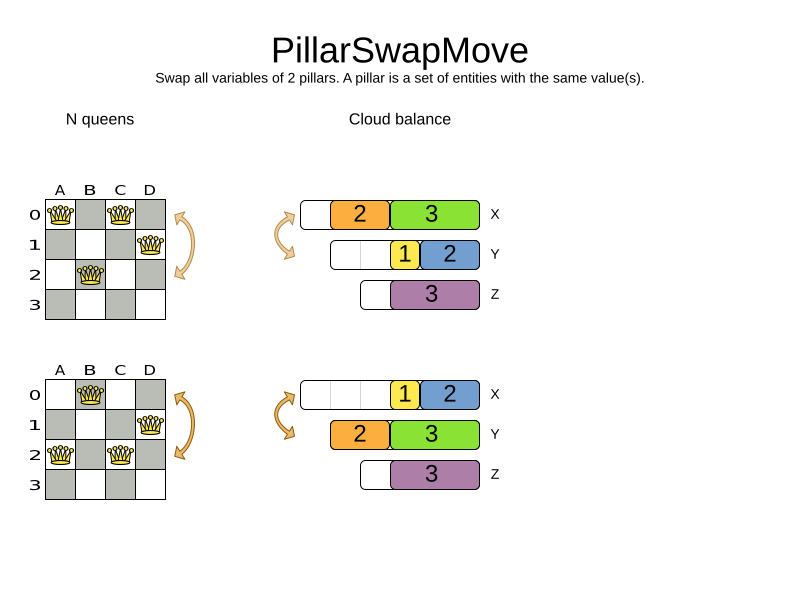
The PillarSwapMove selects two different entity pillars and swaps the values of all their variables for all their entities.
Simplest configuration:
<pillarSwapMoveSelector/>Advanced configuration:
    <pillarSwapMoveSelector>
      <subPillarType>SEQUENCE</subPillarType>
      <subPillarSequenceComparatorClass>...ShiftComparator</subPillarSequenceComparatorClass>
      ... <!-- Normal selector properties -->
      <pillarSelector>
        <entitySelector>
          <entityClass>...Shift</entityClass>
          ...
        </entitySelector>
        <minimumSubPillarSize>1</minimumSubPillarSize>
        <maximumSubPillarSize>1000</maximumSubPillarSize>
      </pillarSelector>
      <secondaryPillarSelector>
        <entitySelector>
          ...
        </entitySelector>
        ...
      </secondaryPillarSelector>
      <variableNameIncludes>
        <variableNameInclude>employee</variableNameInclude>
        <variableNameInclude>...</variableNameInclude>
      </variableNameIncludes>
    </pillarSwapMoveSelector>
For a description of subPillarType and related properties, please refer to sub-pillars.
The secondaryPillarSelector is rarely needed: if it is not specified, entities from the same pillarSelector are swapped.
The other properties are explained in swapMoveSelector and pillarChangeMoveSelector. This move selector doesn’t support phase or solver caching and step caching scales badly memory wise.
2.3.3. Sub-pillars
A sub-pillar is a subset of entities that share the same value(s) for their variable(s).
For example if queen A, B, C and D are all located on row 0, they’re a pillar and [A, D] is one of the many sub-pillars.
There are several ways how sub-pillars can be selected by the subPillarType property:
-
ALL(default) selects all possible sub-pillars. -
SEQUENCElimits selection of sub-pillars to Sequential sub-pillars. -
NONEnever selects any sub-pillars.
If sub-pillars are enabled, the pillar itself is also included and the properties minimumSubPillarSize (defaults to 1) and maximumSubPillarSize (defaults to infinity) limit the size of the selected (sub) pillar.
|
The number of sub-pillars of a pillar is exponential to the size of the pillar.
For example a pillar of size 32 has |
Sequential sub-pillars
sub-pillars can be sorted with a Comparator. A sequential sub-pillar is a continuous subset of its sorted base pillar.
For example, if an employee has shifts on Monday (M), Tuesday (T), and Wednesday (W),
they’re a pillar and only the following are its sequential sub-pillars: [M], [T], [W], [M, T], [T, W], [M, T, W].
But [M, W] is not a sub-pillar in this case, as there is a gap on Tuesday.
Sequential sub-pillars apply to both Pillar change move and Pillar swap move. A minimal configuration looks like this:
    <pillar...MoveSelector>
      <subPillarType>SEQUENCE</subPillarType>
    </pillar...MoveSelector>
In this case, the entity being operated on must implement the Comparable interface. The size of sub-pillars will not be limited in any way.
An advanced configuration looks like this:
    <pillar...MoveSelector>
      ...
      <subPillarType>SEQUENCE</subPillarType>
      <subPillarSequenceComparatorClass>...ShiftComparator</subPillarSequenceComparatorClass>
      <pillarSelector>
        ...
        <minimumSubPillarSize>1</minimumSubPillarSize>
        <maximumSubPillarSize>1000</maximumSubPillarSize>
      </pillarSelector>
      ...
    </pillar...MoveSelector>
In this case, the entity being operated on needn’t be Comparable.
The given subPillarSequenceComparatorClass is used to establish the sequence instead.
Also, the size of the sub-pillars is limited in length of up to 1000 entities.
2.4. RuinRecreateMoveSelector
The RuinRecreateMove selects a subset of entities and sets their values to null,
effectively unassigning them.
Then it runs a construction heuristic to assign them again.
If unassigned values are allowed,
it may leave them unassigned.
This coarse-grained move is useful to help the solver to escape from a local optimum. It allows the solver to effectively "undo" a number of earlier decisions in one step, opening up a new part of the solution space.
|
If nearby selection is enabled,
the |
This move is not enabled by default.
To enable it, add the following to the localSearch section of the solver configuration:
<ruinRecreateMoveSelector/>|
The default values have been determined by extensive benchmarking. That said, the optimal values may vary depending on the problem, available solving time, and dataset at hand. We recommend that you experiment with these values to find the best fit for your problem. |
Advanced configuration:
    <ruinRecreateMoveSelector>
      <minimumRuinedCount>5</minimumRuinedCount>
      <maximumRuinedCount>20</maximumRuinedCount>
      <entitySelector>
        <entityClass>...Lecture</entityClass>
        ...
      </entitySelector>
      <variableName>room</variableName>
    </ruinRecreateMoveSelector>
The minimumRuinedCount and maximumRuinedCount properties limit the number of entities that are unassigned.
The default values are 5 and 20 respectively, but for large datasets,
it may prove beneficial to increase these values.
The entitySelector property specifies which entity should be selected, allowing its values to be ruined and recreated.
In a model with multiple entities, this property is required,
or the solver will fail because it cannot automatically deduce the entity.
When there are multiple basic variables defined in the model, the solver cannot automatically select one of them.
The property variableName allows you to specify which variable will be used by the move generator.
|
|
Since the RuinRecreateMove is a coarse-grained move,
it is expensive and can slow the solver down significantly.
However, the default local search configuration will attempt to run it at the same frequency
as the other fine-grained moves.
For that reason, we recommend that you use probabilistic selection
to control the frequency of this move:
    <unionMoveSelector>
        <unionMoveSelector>
            <fixedProbabilityWeight>100.0</fixedProbabilityWeight>
            <changeMoveSelector/>
            <swapMoveSelector/>
        </unionMoveSelector>
        <ruinRecreateMoveSelector>
            <fixedProbabilityWeight>1.0</fixedProbabilityWeight>
        </ruinRecreateMoveSelector>
    </unionMoveSelector>
The above configuration will run the RuinRecreateMove once for every 100 fine-grained moves.
As always, benchmarking is recommended to find the optimal value for your use case.
2.5. MultistageMoveSelector
|
This feature is a commercial feature of Timefold Solver Enterprise Edition. It is not available in the Community Edition. |
The multistageMoveSelector selects a multistage move to execute from a BasicVariableStageProvider.
The BasicVariableStageProvider is initialized from the working solution at phase start and when selected supplies a list of BasicVariableCustomStage, which each select a move and are executed in order.
Each BasicVariableCustomStage has access to a BasicVariableMoveEvaluator which allows the stage to evaluate moves without executing them.
Configuration:
    <multistageMoveSelector>
        <stageProviderClass>...MyStageProvider</stageProviderClass>
        <entityClass>...Shift</entityClass>
        <variableName>employee</variableName>
    </multistageMoveSelector>
public class MyStageProvider implements BasicVariableStageProvider<Schedule, Shift, Employee, HardSoftScore> {
List<Shift> shiftList;
Map<String, List<Employee>> employeesBySkillMap;
@Override
public void initialize(Schedule schedule) {
this.shiftList = schedule.getShifts();
this.employeesBySkillMap = new HashMap<>();
for (var employee : schedule.getEmployees()) {
this.employeesBySkillMap.computeIfAbsent(employee.getSkill(), ignored -> new ArrayList<>()).add(employee);
}
}
@Override
public List<BasicVariableCustomStage<Schedule, Shift, Employee, HardSoftScore>>
createStages(Random random) {
var shift = shiftList.get(random.nextInt(shiftList.size()));
var employeesWithSkill = employeesBySkillMap.get(shift.getRequiredSkill());
return List.of(
BasicVariableCustomStage.bestFit(shift, employeesWithSkill));
}
}3. Move selectors for list variables
These moves are applicable to list planning variables.
3.1. ListChangeMoveSelector
The ListChangeMoveSelector selects an element from a list variable’s value range and moves it from its current position to a new one.
Simplest configuration:
<listChangeMoveSelector/>Advanced configuration:
    <listChangeMoveSelector>
      ... <!-- Normal selector properties -->
      <valueSelector id="valueSelector1">
        ...
      </valueSelector>
      <destinationSelector>
        <entitySelector>
          ...
        </entitySelector>
        <valueSelector>
          ...
        </valueSelector>
      </destinationSelector>
    </listChangeMoveSelector>
3.2. ListSwapMoveSelector
The ListSwapMoveSelector selects two elements from the same list variable value range and swaps their positions.
Simplest configuration:
<listSwapMoveSelector/>3.3. SubListChangeMoveSelector
A subList is a sequence of elements in a specific entity’s list variable between fromIndex and toIndex.
The SubListChangeMoveSelector selects a source subList by selecting a source entity and the source subList’s fromIndex and toIndex.
Then it selects a destination entity and a destinationIndex in the destination entity’s list variable.
Selecting these parameters results in a SubListChangeMove that removes the source subList elements from the source entity and adds them to the destination entity’s list variable at the destinationIndex.
Simplest configuration:
<subListChangeMoveSelector/>Advanced configuration:
    <subListChangeMoveSelector>
      ... <!-- Normal selector properties -->
      <selectReversingMoveToo>true</selectReversingMoveToo>
      <subListSelector id="subListSelector1">
        <valueSelector>
          ...
        </valueSelector>
        <minimumSubListSize>2</minimumSubListSize>
        <maximumSubListSize>6</maximumSubListSize>
      </subListSelector>
    </subListChangeMoveSelector>
3.4. SubListSwapMoveSelector
A subList is a sequence of elements in a specific entity’s list variable between fromIndex and toIndex.
The SubListSwapMoveSelector selects a left subList by selecting a left entity and the left subList’s fromIndex and toIndex.
Then it selects a right subList by selecting a right entity and the right subList’s fromIndex and toIndex.
Selecting these parameters results in a SubListSwapMove that swaps the right and left subLists between right and left entities.
Simplest configuration:
<subListSwapMoveSelector/>Advanced configuration:
    <subListSwapMoveSelector>
      ... <!-- Normal selector properties -->
      <selectReversingMoveToo>true</selectReversingMoveToo>
      <subListSelector id="subListSelector1">
        <valueSelector>
          ...
        </valueSelector>
        <minimumSubListSize>2</minimumSubListSize>
        <maximumSubListSize>6</maximumSubListSize>
      </subListSelector>
    </subListSwapMoveSelector>
3.5. KOptListMoveSelector
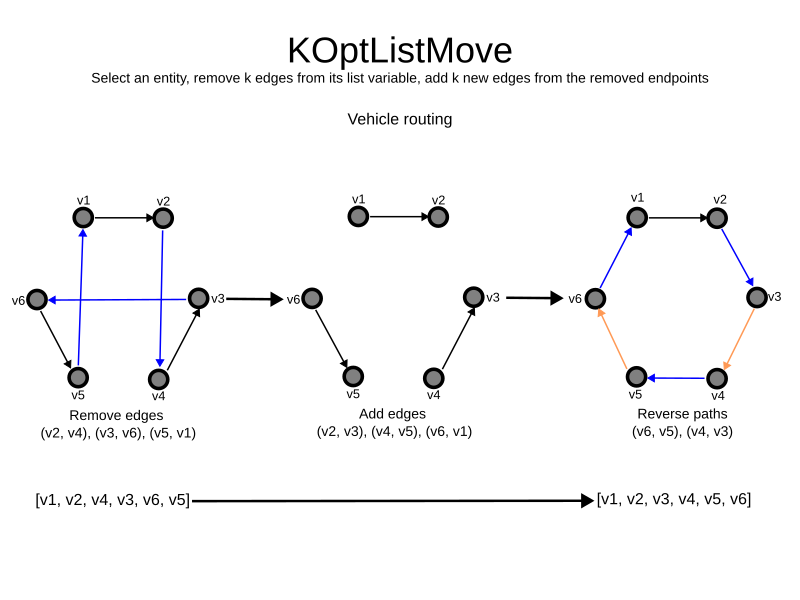
The KOptListMoveSelector considers the list variable to be
a graph whose edges are the consecutive elements of the list
(with the last element being consecutive to the first element).
A KOptListMove selects an entity, remove k edges from its list variable, and add k new edges from the removed edges' endpoints.
This move may reverse segments of the graph.
Simplest configuration:
<kOptListMoveSelector/>Advanced configuration:
    <kOptListMoveSelector>
      ... <!-- Normal selector properties -->
      <minimumK>2</minimumK>
      <maximumK>4</maximumK>
    </kOptListMoveSelector>
3.6. ListRuinRecreateMoveSelector
The ListRuinRecreateMove selects a subset of values, and removes them from their list variables.
Then it runs a construction heuristic to assign them again.
If unassigned values are allowed,
it may leave them unassigned.
This coarse-grained move is useful to help the solver to escape from a local optimum. It allows the solver to effectively "undo" a number of earlier decisions in one step, opening up a new part of the solution space.
|
If nearby selection is enabled,
the |
This move is not enabled by default.
To enable it, add the following to the localSearch section of the solver configuration:
<listRuinRecreateMoveSelector/>|
The default values have been determined by extensive benchmarking. That said, the optimal values may vary depending on the problem, available solving time, and dataset at hand. We recommend that you experiment with these values to find the best fit for your problem. |
Advanced configuration:
    <listRuinRecreateMoveSelector>
      <minimumRuinedCount>5</minimumRuinedCount>
      <maximumRuinedCount>40</maximumRuinedCount>
    </listRuinRecreateMoveSelector>
The minimumRuinedCount and maximumRuinedCount properties limit the number of values that are unassigned.
The default values are 5 and 20 respectively, but for large datasets,
it may prove beneficial to increase these values.
|
|
Since the ListRuinRecreateMove is a coarse-grained move,
it is expensive and can slow the solver down significantly.
However, the default local search configuration will attempt to run it at the same frequency
as the other fine-grained moves.
For that reason, we recommend that you use probabilistic selection
to control the frequency of this move:
    <unionMoveSelector>
        <unionMoveSelector>
            <fixedProbabilityWeight>100.0</fixedProbabilityWeight>
            <listChangeMoveSelector/>
            <listSwapMoveSelector/>
        </unionMoveSelector>
        <listRuinRecreateMoveSelector>
            <fixedProbabilityWeight>1.0</fixedProbabilityWeight>
        </listRuinRecreateMoveSelector>
    </unionMoveSelector>
The above configuration will run the ListRuinRecreateMove once for every 100 fine-grained moves.
As always, benchmarking is recommended to find the optimal value for your use case.
3.7. ListMultistageMoveSelector
|
This feature is a commercial feature of Timefold Solver Enterprise Edition. It is not available in the Community Edition. |
The listMultistageMoveSelector selects a multistage move to execute from a ListVariableStageProvider.
The ListVariableStageProvider is initialized from the working solution at phase start and when selected supplies a list of ListVariableCustomStage, which each select a move and are executed in order.
Each ListVariableCustomStage has access to a ListVariableMoveEvaluator which allows the stage to evaluate moves without executing them.
Configuration:
    <listMultistageMoveSelector>
        <stageProviderClass>...MyStageProvider</stageProviderClass>
    </listMultistageMoveSelector>
public class MyStageProvider implements ListVariableStageProvider<RoutePlan, Vehicle, Visit, HardSoftScore> {
List<Visit> visitList;
Map<String, List<Vehicle>> vehiclesBySkillMap;
@Override
public void initialize(RoutePlan routePlan) {
this.visitList = routePlan.getVisits();
this.vehiclesBySkillMap = new HashMap<>();
for (var vehicle : routePlan.getVehicles()) {
this.vehiclesBySkillMap.computeIfAbsent(vehicle.getSkill(), ignored -> new ArrayList<>()).add(vehicle);
}
}
@Override
public List<ListVariableCustomStage<RoutePlan, Vehicle, Visit, HardSoftScore>>
createStages(Random random) {
var visit = visitList.get(random.nextInt(visitList.size()));
var vehiclesWithSkill = vehiclesBySkillMap.get(visit.getRequiredSkill());
return List.of(
ListVariableCustomStage.bestFit(visit, vehiclesWithSkill));
}
}4. Custom moves
Instead of using the generic Moves (such as ChangeMove) you can also implement your own Move.
Generic and custom MoveSelectors can be combined as desired.
A custom Move can be tailored to work to the advantage of your constraints.
For example, in examination scheduling, changing the period of an exam A
would also change the period of all the other exams that need to coincide with exam A.
A custom Move is far more work to implement and much harder to avoid bugs than a generic Move.
After implementing a custom Move, turn on environmentMode TRACED_FULL_ASSERT to check for score corruptions.
For information on the Move interface, check out the
Move Anatomy section of the Neighborhoods chapter.
Even though Neighborhoods is an entirely different mechanism than move selectors,
they share the Move interface and therefore the same custom Move can be used in both mechanisms.
4.1. Generating custom moves
Now, let’s generate instances of this custom Move class.
There are 2 ways:
4.1.1. MoveListFactory: the easy way to generate custom moves
The easiest way to generate custom moves is by implementing the interface MoveListFactory:
public interface MoveListFactory<Solution_> {

    List<Move> createMoveList(Solution_ solution);

}
Simple configuration (which can be nested in a unionMoveSelector just like any other MoveSelector):
    <moveListFactory>
      <moveListFactoryClass>...MyMoveFactory</moveListFactoryClass>
    </moveListFactory>
Advanced configuration:
    <moveListFactory>
      ... <!-- Normal moveSelector properties -->
      <moveListFactoryClass>...MyMoveFactory</moveListFactoryClass>
      <moveListFactoryCustomProperties>
        ...<!-- Custom properties -->
      </moveListFactoryCustomProperties>
    </moveListFactory>
Because the MoveListFactory generates all moves at once in a List<Move>,
it does not support cacheType JUST_IN_TIME.
Therefore, moveListFactory uses cacheType STEP by default and it scales badly.
To configure values of a MoveListFactory dynamically in the solver configuration
(so the Benchmarker can tweak those parameters),
add the moveListFactoryCustomProperties element and use custom properties.
|
A custom |
4.1.2. MoveIteratorFactory: generate Custom moves just in time
Use this advanced form to generate custom moves Just In Time
by implementing the MoveIteratorFactory interface:
public interface MoveIteratorFactory<Solution_> {

    long getSize(ScoreDirector<Solution_> scoreDirector);

    Iterator<Move> createOriginalMoveIterator(ScoreDirector<Solution_> scoreDirector);

    Iterator<Move> createRandomMoveIterator(ScoreDirector<Solution_> scoreDirector, Random workingRandom);

}
The getSize() method must return an estimation of the size.
It doesn’t need to be correct, but it’s better too big than too small.
The createOriginalMoveIterator method is called if the selectionOrder is ORIGINAL or if it is cached.
The createRandomMoveIterator method is called for selectionOrder RANDOM combined with cacheType JUST_IN_TIME.
|
Don’t create a collection (array, list, set or map) of |
For example:
public class PossibleAssignmentsOnlyMoveIteratorFactory implements MoveIteratorFactory<MyPlanningSolution, MyChangeMove> {
    @Override
    public long getSize(ScoreDirector<MyPlanningSolution> scoreDirector) {
        // In this case, we return the exact size, but an estimate can be used
        // if it too expensive to calculate or unknown
        long totalSize = 0L;
        var solution = scoreDirector.getWorkingSolution();
        for (MyEntity entity : solution.getEntities()) {
            for (MyPlanningValue value : solution.getValues()) {
                if (entity.canBeAssigned(value)) {
                    totalSize++;
                }
            }
        }
        return totalSize;
    }

    @Override
    public Iterator<MyChangeMove> createOriginalMoveIterator(ScoreDirector<MyPlanningSolution> scoreDirector) {
        // Only needed if selectionOrder is ORIGINAL or if it is cached
        var solution = scoreDirector.getWorkingSolution();
        var entities = solution.getEntities();
        var values = solution.getValues();
        // Assumes each entity has at least one assignable value
        var firstEntityIndex = 0;
        var firstValueIndex = 0;
        while (!entities.get(firstEntityIndex).canBeAssigned(values.get(firstValueIndex))) {
            firstValueIndex++;
        }


        return new Iterator<>() {
            int nextEntityIndex = firstEntityIndex;
            int nextValueIndex = firstValueIndex;

            @Override
            public boolean hasNext() {
                return nextEntityIndex < entities.size();
            }

            @Override
            public MyChangeMove next() {
                var selectedEntity = entities.get(nextEntityIndex);
                var selectedValue = values.get(nextValueIndex);
                nextValueIndex++;
                while (nextValueIndex < values.size() && !selectedEntity.canBeAssigned(values.get(nextValueIndex))) {
                    nextValueIndex++;
                }
                if (nextValueIndex >= values.size()) {
                    // value list exhausted, go to next entity
                    nextEntityIndex++;
                    if (nextEntityIndex < entities.size()) {
                        nextValueIndex = 0;
                        while (nextValueIndex < values.size() && !entities.get(nextEntityIndex).canBeAssigned(values.get(nextValueIndex))) {
                            // Assumes each entity has at least one assignable value
                            nextValueIndex++;
                        }
                    }
                }
                return new MyChangeMove(selectedEntity, selectedValue);
            }
        };
    }

    @Override
    public Iterator<MyChangeMove> createRandomMoveIterator(ScoreDirector<MyPlanningSolution> scoreDirector,
            Random workingRandom) {
        // Not needed if selectionOrder is ORIGINAL or if it is cached
        var solution = scoreDirector.getWorkingSolution();
        var entities = solution.getEntities();
        var values = solution.getValues();

        return new Iterator<>() {
            @Override
            public boolean hasNext() {
                return !entities.isEmpty();
            }

            @Override
            public MyChangeMove next() {
                var selectedEntity = entities.get(workingRandom.nextInt(entities.size()));
                var selectedValue = values.get(workingRandom.nextInt(values.size()));
                while (!selectedEntity.canBeAssigned(selectedValue)) {
                    // This assumes there at least one value that can be assigned to the selected entity
                    selectedValue = values.get(workingRandom.nextInt(values.size()));
                }
                return new MyChangeMove(selectedEntity, selectedValue);
            }
        };
    }
}|
The same effect can also be accomplished using filtered selection. |
Simple configuration (which can be nested in a unionMoveSelector just like any other MoveSelector):
    <moveIteratorFactory>
      <moveIteratorFactoryClass>...</moveIteratorFactoryClass>
    </moveIteratorFactory>
Advanced configuration:
    <moveIteratorFactory>
      ... <!-- Normal moveSelector properties -->
      <moveIteratorFactoryClass>...</moveIteratorFactoryClass>
      <moveIteratorFactoryCustomProperties>
        ...<!-- Custom properties -->
      </moveIteratorFactoryCustomProperties>
    </moveIteratorFactory>
To configure values of a MoveIteratorFactory dynamically in the solver configuration
(so the Benchmarker can tweak those parameters),
add the moveIteratorFactoryCustomProperties element and use custom properties.
|
A custom |